ClickUp Guide for Beginners
SEO Title: ClickUp: Complete Beginner’s Guide (2026)
Meta Description: Learn how ClickUp helps you manage projects, organize tasks, collaborate with teams, and boost productivity with this complete beginner-friendly guide.
Introduction
Managing multiple projects can quickly become overwhelming. Whether you’re a blogger, freelancer, student, or online business owner, staying organized is essential. ClickUp is one of the world’s leading productivity and project management platforms, designed to help you manage tasks, documents, goals, calendars, and teamwork from one place.
This guide explains everything beginners need to know about ClickUp in simple language while helping you understand why millions of professionals use it every day.
What is ClickUp?
ClickUp is an all-in-one work management platform that combines project management, task tracking, documents, dashboards, chat, automation, and AI into a single workspace. Instead of switching between many different apps, ClickUp keeps your work organized in one system.
It works on desktop, web browsers, Android, and iPhone, making it easy to stay productive anywhere.
Why ClickUp is Popular
ClickUp has become popular because it offers flexibility for both individuals and teams. You can customize workflows, create unlimited task structures, choose different project views, and automate repetitive work without coding.
Main Benefits
- Organize projects efficiently
- Track deadlines visually
- Collaborate with team members
- Create documents and notes
- Automate repetitive workflows
- Monitor progress with dashboards
How ClickUp Works
ClickUp organizes work using a simple hierarchy that grows with your business. A Workspace contains Spaces, Spaces contain Folders and Lists, and Lists contain Tasks and Subtasks. This structure allows small projects and large organizations to stay organized.
| Level | Purpose |
|---|---|
| Workspace | Your entire organization |
| Space | Department or category |
| Folder | Group related projects |
| List | Collection of tasks |
| Task | Individual work item |
Best Features for Beginners
1. Task Management
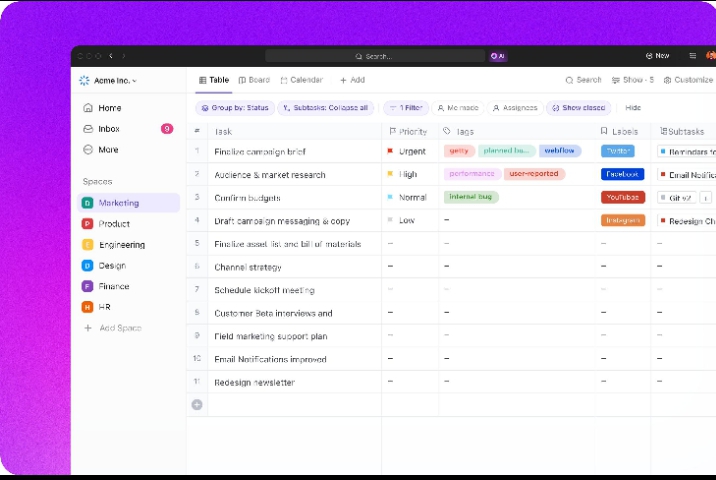
Create tasks, assign priorities, add due dates, attach files, and track progress. Tasks can also include subtasks for breaking large projects into smaller steps.
2. Multiple Project Views
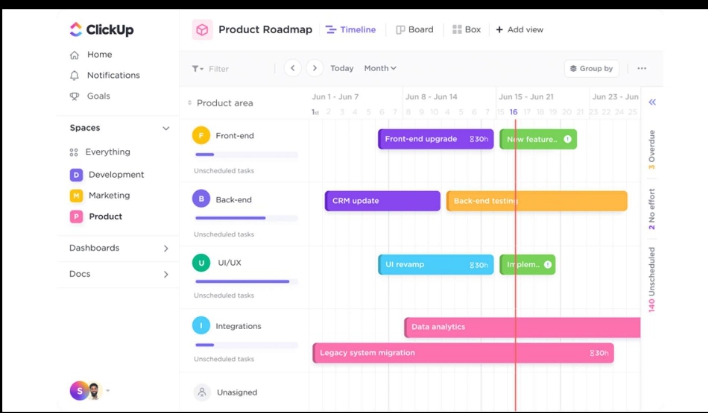
ClickUp lets you switch between different layouts depending on how you prefer to work.
- List View
- Board (Kanban)
- Calendar
- Timeline
- Gantt Chart
- Table View
These views help visualize projects in different ways.
3. ClickUp Docs
You can write meeting notes, SOPs, blog outlines, and company documentation directly inside ClickUp. Documents stay connected to your tasks and projects.
4. Dashboards
Dashboards provide real-time reports showing completed tasks, overdue work, workload, and project progress. They’re especially useful for business owners managing multiple projects.
5. Automation
Automation removes repetitive work by creating rules such as:
- Change task status automatically
- Assign tasks to team members
- Send notifications
- Update due dates
These workflows improve productivity without manual effort.
ClickUp AI (Brain)
One of the biggest additions to ClickUp is ClickUp Brain, an AI assistant that helps generate content, summarize projects, answer questions about your workspace, and automate knowledge management. Feature availability depends on your plan.
Who Should Use ClickUp?
ClickUp is suitable for many different professions.
| User | How ClickUp Helps |
|---|---|
| Bloggers | Editorial calendar |
| Freelancers | Client management |
| Students | Assignment planning |
| Marketers | Campaign tracking |
| Small Businesses | Project organization |
ClickUp Pricing Overview
ClickUp offers a Free Forever plan alongside paid plans that unlock additional automation, reporting, AI, and advanced collaboration features. Beginners can start with the free version before upgrading as their business grows.
Tips for Using ClickUp Effectively
- Create one Workspace for your business.
- Use Lists for different projects.
- Add priorities to important tasks.
- Set realistic deadlines.
- Use recurring tasks for weekly work.
- Review your dashboard every day.
- Keep documents linked to projects.
Advantages and Disadvantages
Pros
- Beginner-friendly interface
- Powerful customization
- Excellent collaboration tools
- Free plan available
- Works across all devices
Cons
- Many features may feel overwhelming at first
- Advanced AI features require eligible plans
- Large teams need time to customize workflows
SEO Keywords
Primary Keyword:
– ClickUp Guide for Beginners
Secondary Keywords:
- ClickUp tutorial
- Project management software
- ClickUp AI
- Task management app
- Productivity tools 2026
- ClickUp for freelancers
FAQ
Is ClickUp free to use?
Yes. ClickUp offers a Free Forever plan with core project management features for individuals and small teams.
Is ClickUp good for bloggers?
Yes. Bloggers can manage content calendars, article planning, SEO workflows, and publishing schedules inside ClickUp.
Can freelancers use ClickUp?
Absolutely. Freelancers can organize clients, projects, invoices, deadlines, and recurring work in one workspace.
Does ClickUp include AI?
Yes. ClickUp Brain provides AI-powered writing, summaries, workspace search, and productivity features on eligible plans.
Conclusion
ClickUp is one of the best productivity and project management platforms for beginners in 2026. Its combination of tasks, documents, dashboards, automation, calendars, and AI makes it an excellent choice for anyone who wants to organize work professionally and grow an online business.