
Focus Keyword: Monday.com Guide for Beginners
Meta Description: Learn how to use Monday.com for project management, task organization, automation, and team collaboration with this complete SEO guide for beginners.
Introduction
If you’re looking for a powerful productivity and project management tool, Monday.com is one of the best platforms available in 2026. Whether you’re a freelancer, blogger, online business owner, or part of a growing team, Monday.com helps you organize tasks, manage projects, automate repetitive work, and collaborate efficiently.
This guide explains everything beginners need to know—from creating your first board to choosing the right pricing plan.
What is Monday.com?
Monday.com is a cloud-based Work OS (Work Operating System) that allows users to manage projects visually using customizable boards, timelines, calendars, dashboards, and automation tools. Instead of juggling spreadsheets and endless emails, all your work lives in one organized workspace.
Who should use Monday.com?
- Freelancers managing client projects
- Bloggers planning content calendars
- Affiliate marketers organizing campaigns
- Small businesses tracking daily operations
- Marketing and remote teams collaborating online
Why is Monday.com so popular?
Unlike traditional task apps, Monday.com combines project management, communication, reporting, and workflow automation in one platform. Teams can customize everything without needing programming skills.
Top advantages
| Feature | Benefit |
|---|---|
| Visual boards | Easy project organization |
| Timeline | Track deadlines clearly |
| Calendar view | Schedule upcoming work |
| Automation | Save time on repetitive tasks |
| Dashboards | Measure project performance |
| Mobile app | Work from anywhere |
How Monday.com works
The platform is built around Workspaces → Boards → Groups → Tasks.
For example, if you run MubarekBlog1, you could create:
- Workspace: Online Business
- Board: Content Marketing
- Groups: To Do, Writing, Published
- Tasks: Write article, Add images, Share on Pinterest
This simple structure keeps your website workflow organized.
Essential features explained
1. Task Management
Every project begins with tasks. You can assign owners, add due dates, priorities, notes, files, and status labels.
Example:
| Task | Status |
|---|---|
| Write article | In Progress |
| Add SEO | Done |
| Publish post | Pending |
2. Kanban Board
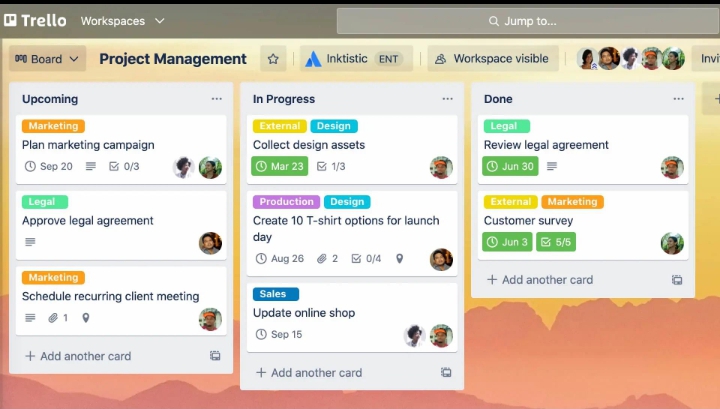
The Kanban view lets you drag tasks between different stages.
Typical workflow:
- To Do
- Working
- Review
- Published
This is especially useful for bloggers publishing weekly articles.
3. Timeline & Calendar

Deadlines become much easier to manage with visual scheduling. Marketing teams often use Timeline view to plan campaigns weeks ahead.
4. Dashboards
Dashboards transform project data into charts and performance reports. You can monitor completed tasks, overdue work, team workload, and overall progress from one screen.
5. Automation
Automation removes repetitive work. For example:
When Status changes to Done → Notify the team automatically.
Even beginners can build automations without coding.
Monday.com Pricing (2026)
Monday.com offers both a Free plan and several paid plans for growing teams. The Free plan supports up to 2 seats and includes core project management features, while Basic, Standard, Pro, and Enterprise unlock more automation, integrations, dashboards, and advanced views. Annual billing also offers discounted pricing.
| Plan | Best for |
|---|---|
| Free | Beginners |
| Basic | Individuals |
| Standard | Small teams |
| Pro | Growing businesses |
| Enterprise | Large organizations |
Recommendation: Start with the Free Plan, learn the platform, then upgrade only if your business needs automation or advanced reporting.
Monday.com vs Trello
| Feature | Monday.com | Trello |
|---|---|---|
| Kanban | ✅ | ✅ |
| Timeline | ✅ | Limited |
| Dashboards | ✅ | Limited |
| Automation | Advanced | Basic |
| Reporting | Excellent | Simple |
If your projects become more complex, Monday.com generally provides greater flexibility.
How bloggers can use Monday.com
For a website like MubarekBlog1, you can create a complete editorial calendar.
| Stage | Example |
|---|---|
| Research | Find keywords |
| Writing | Draft article |
| SEO | Add internal links |
| Images | Design thumbnails |
| Publish | Upload to WordPress |
| Promotion | Pinterest & LinkedIn |
This helps ensure every article follows the same professional publishing process.
SEO & content workflow idea
A practical workflow for affiliate marketers:
- Keyword research
- Write 1500-word article
- Add internal links
- Add external authority links
- Optimize Rank Math
- Publish
- Share on Pinterest & LinkedIn
Using Monday.com makes every step trackable.
Internal Links (add inside your article)
Use these naturally within the content:
External Link
Use the official website as your authority source:
– Monday.com Official Website ()
SEO Keywords
Primary Keyword: Monday.com Guide for Beginners
Secondary Keywords:
FAQ
Is Monday.com free?
Yes. Monday.com includes a Free plan for up to 2 users with essential project management features.
Is Monday.com good for bloggers?
Yes. It’s excellent for planning content calendars, tracking SEO tasks, and managing publishing workflows.
Can freelancers use Monday.com?
Absolutely. Freelancers can organize clients, deadlines, invoices, and ongoing projects from one dashboard.
Final Thoughts
Monday.com is one of the strongest productivity platforms available in 2026 because it combines project management, collaboration, automation, dashboards, and planning into one flexible workspace. Beginners can start free, build organized workflows, and scale as their online business grows.